ByteDance LLM Application Go Framework — Eino in Practice
Preface
Building LLM-powered applications is like coaching a football team: components are players, orchestration is the strategy, and data is the ball flowing through the team. Eino is ByteDance’s open-source framework for LLM application development — stable core, flexible extensions, full tooling, and battle-tested in real apps like Doubao and TikTok. Picking up Eino feels like inheriting a strong team: even a new coach can lead a meaningful game quickly.
Let’s kick off the ramp-up journey.
Meet the Players
Eino applications are built from versatile components:
| Component | Purpose |
| ChatModel | Interact with LLM: input `Message[]`, output `Message` |
| Tool | Interact with the world: execute actions based on model output |
| Retriever | Fetch context so answers are grounded |
| ChatTemplate | Convert external input into prompt messages |
| Document Loader | Load text |
| Document Transformer | Transform text |
| Indexer | Store and index documents for retrieval |
| Embedding | Shared dependency of Retriever/Indexer: text → vector |
| Lambda | Custom function |
Each abstraction defines input/output types, options, and method signatures:
type ChatModel interface {
    Generate(ctx context.Context, input []*schema.Message, opts ...Option) (*schema.Message, error)
    Stream(ctx context.Context, input []*schema.Message, opts ...Option) (*schema.StreamReader[*schema.Message], error)
    BindTools(tools []*schema.ToolInfo) error
}
Implementations make them concrete:
| Component | Official implementations |
| ChatModel | OpenAI, Claude, Gemini, Ark, Ollama... |
| Tool | Google Search, DuckDuckGo... |
| Retriever | ElasticSearch, Volc VikingDB... |
| ChatTemplate | DefaultChatTemplate... |
| Document Loader | WebURL, Amazon S3, File... |
| Document Transformer | HTMLSplitter, ScoreReranker... |
| Indexer | ElasticSearch, Volc VikingDB... |
| Embedding | OpenAI, Ark... |
| Lambda | JSONMessageParser... |
Decide the abstraction first (“we need a forward”), then pick an implementation (“who plays forward”). Components can be used standalone, but Eino shines when components are orchestrated.
Plan the Strategy
In Eino, each component becomes a Node; 1→1 connections are Edges; N→1 conditional flow is a Branch. Orchestration supports rich business logic:
| Style | Use cases |
| Chain | Simple forward-only DAG; ideal for linear flows |
| Graph | Directed (cyclic or acyclic) graphs for maximal flexibility |
Chain: simple ChatTemplate → ChatModel chain.

chain, _ := NewChain[map[string]any, *Message]().
           AppendChatTemplate(prompt).
           AppendChatModel(model).
           Compile(ctx)
chain.Invoke(ctx, map[string]any{"query": "what's your name?"})
Graph: an agent that makes at most one tool call.

graph := NewGraph[map[string]any, *schema.Message]()
_ = graph.AddChatTemplateNode("node_template", chatTpl)
_ = graph.AddChatModelNode("node_model", chatModel)
_ = graph.AddToolsNode("node_tools", toolsNode)
_ = graph.AddLambdaNode("node_converter", takeOne)
_ = graph.AddEdge(START, "node_template")
_ = graph.AddEdge("node_template", "node_model")
_ = graph.AddBranch("node_model", branch)
_ = graph.AddEdge("node_tools", "node_converter")
_ = graph.AddEdge("node_converter", END)
compiledGraph, err := graph.Compile(ctx)
out, err := compiledGraph.Invoke(ctx, map[string]any{"query":"Beijing's weather this weekend"})
Operational Tools
Callbacks capture node start/end (and stream variants) for cross-cutting concerns like logging, tracing, metrics:
handler := NewHandlerBuilder().
  OnStartFn(func(ctx context.Context, info *RunInfo, input CallbackInput) context.Context {
      log.Printf("onStart, runInfo: %v, input: %v", info, input); return ctx }).
  OnEndFn(func(ctx context.Context, info *RunInfo, output CallbackOutput) context.Context {
      log.Printf("onEnd, runInfo: %v, out: %v", info, output); return ctx }).
  Build()
compiledGraph.Invoke(ctx, input, WithCallbacks(handler))
Call options target all nodes, nodes of a specific type, or a specific node:
compiledGraph.Invoke(ctx, input, WithCallbacks(handler))
compiledGraph.Invoke(ctx, input, WithChatModelOption(model.WithTemperature(0.5)))
compiledGraph.Invoke(ctx, input, WithCallbacks(handler).DesignateNode("node_1"))
Streaming Mastery
Some components output streams (fragments of a final value), others consume streams. Components implement the paradigms that match real business semantics:
// ChatModel supports Invoke and Stream
type ChatModel interface {
    Generate(ctx context.Context, input []*Message, opts ...Option) (*Message, error)
    Stream(ctx context.Context, input []*Message, opts ...Option) (*schema.StreamReader[*Message], error)
}

// Lambda can implement any of the four
type Invoke[I, O, TOption any] func(ctx context.Context, input I, opts ...TOption) (O, error)
type Stream[I, O, TOption any] func(ctx context.Context, input I, opts ...TOption) (*schema.StreamReader[O], error)
type Collect[I, O, TOption any] func(ctx context.Context, input *schema.StreamReader[I], opts ...TOption) (O, error)
type Transform[I, O, TOption any] func(ctx context.Context, input *schema.StreamReader[I], opts ...TOption) (*schema.StreamReader[O], error)
Orchestration automatically handles:
- Concat streams when downstream only accepts non-streaming.
- Box non-streaming values into single-frame streams when downstream expects streaming.
- Merge/copy streams as needed.
A Scrimmage — Eino Assistant
Goal: retrieve from a knowledge base and use tools as needed. Tools:
- DuckDuckGo search
- EinoTool (repo/docs metadata)
- GitClone (clone repo)
- TaskManager (add/view/delete tasks)
- OpenURL (open links/files)
Two parts:
- Knowledge Indexing: split/encode Markdown docs into vectors
- Eino Agent: decide actions, call tools, iterate until the goal is met
Workflow
Knowledge Indexing

Eino Agent

Required Tools
| Tooling | Required | Purpose | References |
| Eino | Yes | Go-first LLM framework plus components and orchestration | |
| EinoDev (GoLand/VS Code) | No | Visual orchestration and debugging | |
| Volc Doubao (model/embedding) | Yes | Chat model and embedding for indexing | Doubao Console |
| Docker | No | Deploy RedisSearch (or install manually) | Docker Docs |
| Eino Assistant Sample | Yes | Complete sample code | Sample repo |
Indexing the Knowledge Base
Sample repository path: https://github.com/cloudwego/eino-examples/tree/main/quickstart/eino_assistant
Below, paths are relative to this directory
Build a CLI that recursively traverses Markdown files, splits them by headings, vectorizes each chunk with Doubao embedding, and stores vectors in Redis VectorStore.
Command-line tool directory:
cmd/knowledgeindexingMarkdown docs directory:
cmd/knowledgeindexing/eino-docs
Use EinoDev (GoLand/VS Code) to visually compose the core workflow, then generate code into eino_assistant/eino/knowledgeindexing. After generation, complete the constructors for each component and call BuildKnowledgeIndexing in your business code to build and use the Eino Graph instance.
Model Resources
Volcengine Ark hosts Doubao models. Register resources (ample free quota available):
- Create
doubao-embedding-largefor indexing - Create
doubao-pro-4kfor chat/agent reasoning - Console: https://console.volcengine.com/ark

Start Redis Stack
Use Redis Stack as the vector database. The sample provides a quick Docker setup:
eino-examples/quickstart/eino_assistant/docker-compose.yml- Initial Redis data under
eino-examples/quickstart/eino_assistant/data
Start with the official Redis Stack image:
# Switch to eino_assistant
cd xxx/eino-examples/quickstart/eino_assistant

docker-compose up -d

- After startup, open
http://127.0.0.1:8001for the Redis Stack web UI
Visual Orchestration
Visual orchestration lowers the learning curve and speeds up development. Experienced users can skip and build directly with Eino APIs.
Install EinoDev and open the Eino Workflow panel
Installation:
/docs/eino/core_modules/devops/ide_plugin_guideGraph name:
KnowledgeIndexingNode trigger mode: triggered after all predecessor nodes are executed
Input type:
document.SourceInput type import path:
github.com/cloudwego/eino/components/documentOutput type:
[]stringOthers: empty

Select the needed components per the indexing flow:
document/loader/file: load files from URI intoschema.Document[]document/transformer/splitter/markdown: split content into suitable chunk sizesindexer/redis: store raw text and index fields in Redis Vector DBembedding/ark: compute embeddings via Ark
Compose the topology and click “Generate Code” to a target directory
- Generate to:
eino_assistant/eino/knowledgeindexing - You can copy the graph schema from
eino/knowledge_indexing.json


- Generate to:
Complete each component’s constructor with the required configuration


Call
BuildKnowledgeIndexingfrom your business code
Polish the Code
Generated code may need manual review. The core function is BuildKnowledgeIndexing(). Wrap it in a CLI that reads model configuration from environment variables, initializes the graph config, scans the Markdown directory, and performs indexing.
See:
cmd/knowledgeindexing/main.go

Run
The sample already ships with part of the Eino docs pre-indexed in Redis.
- Populate
.envwithARK_EMBEDDING_MODELandARK_API_KEY, then:
cd xxx/eino-examples/quickstart/eino_assistant

# Load env vars (model info, tracing platform info)
source .env

# The sample Markdown lives in cmd/knowledgeindexing/eino-docs.
# Because the code uses the relative path "eino-docs", run from cmd/knowledgeindexing
cd cmd/knowledgeindexing
go run main.go

- After success, open the Redis web UI to inspect the indexed vectors:
http://127.0.0.1:8001

Eino Agent
Sample repository path: https://github.com/cloudwego/eino-examples/tree/main/quickstart/eino_assistant
Build a typical RAG ReAct agent that retrieves context from Redis VectorStore, answers user questions, and executes actions such as task management, repo cloning, and opening links.
Model Resources
Reuse doubao-embedding-large and doubao-pro-4k created earlier.
Start RedisSearch
Reuse the Redis Stack from the indexing section.
Visual Orchestration
In EinoDev → Eino Workflow, create a canvas:
- Graph name:
EinoAgent - Node trigger mode: trigger when any predecessor finishes
- Input type name:
*UserMessage - Input package path: ""
- Output type name:
*schema.Message - Output import path:
github.com/cloudwego/eino/schema - Others: empty
- Graph name:
Choose components:
lambda: wrapfunc(ctx context.Context, input I) (O, error)as nodes- Convert
*UserMessage→map[string]anyfor ChatTemplate - Convert
*UserMessage→ query string for RedisRetriever
- Convert
retriever/redis: retrieveschema.Document[]by semantic similarityprompt/chatTemplate: construct prompts from string templates with substitutionsflow/agent/react: decide next actions with tools and ChatModelmodel/ark: Doubao chat model for ReAct reasoning- Tools: DuckDuckGo, EinoTool, GitClone, TaskManager, OpenURL
Generate code to
eino/einoagent; you can copy fromeino/eino_agent.json

Complete constructors with required configuration


Call
BuildEinoAgentfrom your business code
Polish the Code
BuildEinoAgent constructs a graph that, given user input and history, retrieves context from the knowledge base and iteratively decides whether to call a tool or produce the final answer.
Wrap the agent as an HTTP service:

Run
cd eino-examples/eino_assistant

# Load env vars (model info, tracing platform info)
source .env

# Run from eino_assistant to use the embedded data directory
go run cmd/einoagent/*.go

Open the web UI:
http://127.0.0.1:8080/agent/
Observability (Optional)
APMPlus: set
APMPLUS_APP_KEYin.envand view traces/metrics at https://console.volcengine.com/apmplus-server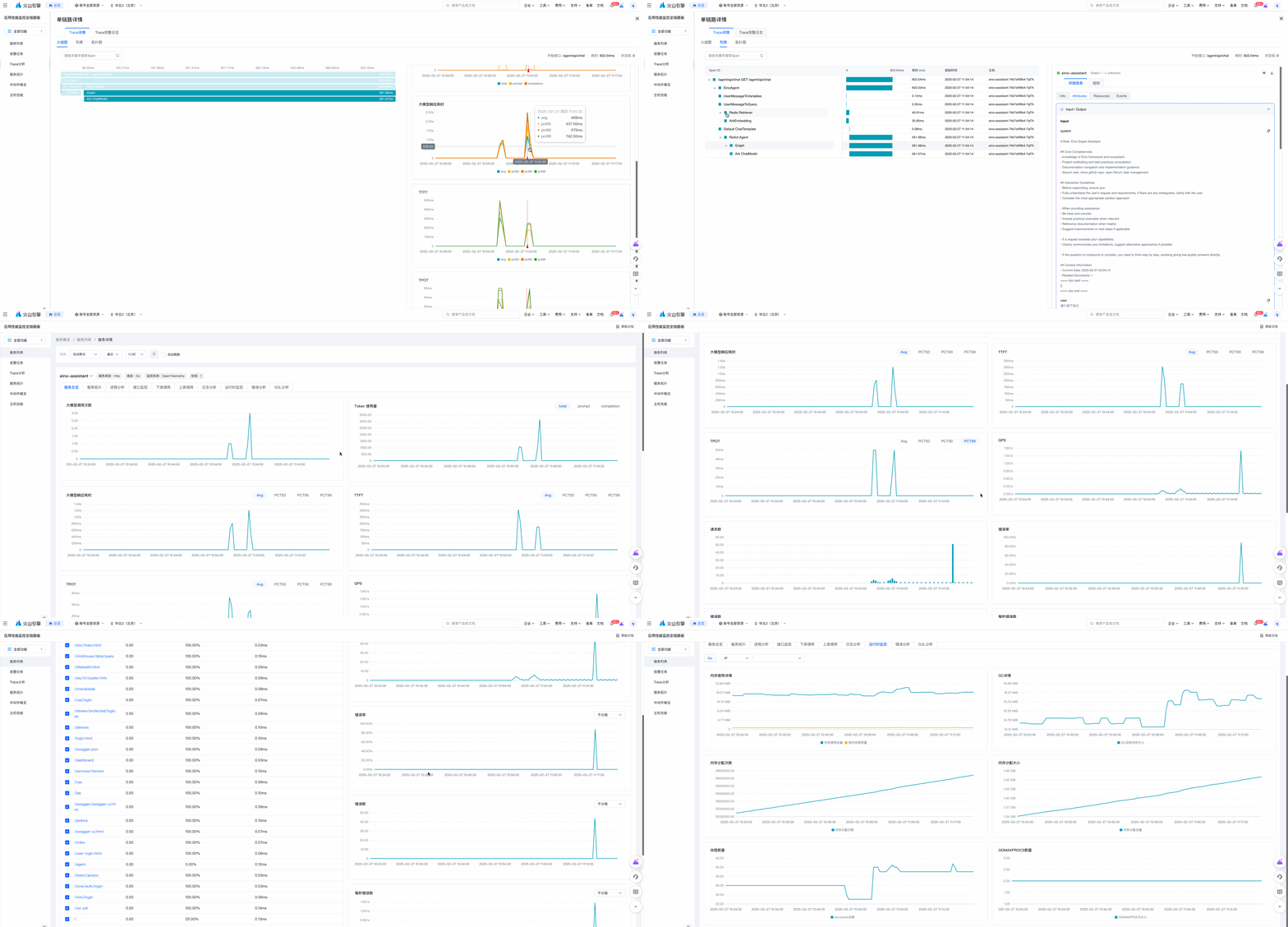
Langfuse: set
LANGFUSE_PUBLIC_KEYandLANGFUSE_SECRET_KEYto inspect trace details
Related Links
Project: https://github.com/cloudwego/eino, https://github.com/cloudwego/eino-ext
Eino User Manual: https://www.cloudwego.io/docs/eino/
Website: https://www.cloudwego.io
Join the developer community:
