AgenticToolsNode & Tool User Guide [Beta]
💡 This feature is available starting from v0.9. This document is based on the current main branch source code, with code primarily located in
compose/agentic_tools_node.go,compose/tool_node.go,components/tool/interface.go, andschema/tool.go.
Introduction
AgenticToolsNode is the tool execution node on the agentic message path in Eino. It receives *schema.AgenticMessage, extracts tool calls from the FunctionToolCall content blocks, leverages ToolsNode’s execution capabilities to perform local tool execution, and then converts the results into FunctionToolResult content blocks for return.
It is not responsible for “deciding which tool to call”. Tool selection is done by the upstream AgenticModel; AgenticToolsNode only executes the corresponding tools based on the function tool calls in the input message.
💡
AgenticToolsNodeis an agentic wrapper layer aroundToolsNode, so it reusesToolsNodeConfig,ToolsNodeOption, tool aliases, exception handling, execution order, argument handlers, and tool middleware capabilities.
AgenticToolsNode Definition
Code location: compose/agentic_tools_node.go
func NewAgenticToolsNode(ctx context.Context, conf *ToolsNodeConfig) (*AgenticToolsNode, error)

type AgenticToolsNode struct {
    inner *ToolsNode
}

func (a *AgenticToolsNode) Invoke(ctx context.Context, input *schema.AgenticMessage, opts ...ToolsNodeOption) ([]*schema.AgenticMessage, error)

func (a *AgenticToolsNode) Stream(ctx context.Context, input *schema.AgenticMessage, opts ...ToolsNodeOption) (*schema.StreamReader[[]*schema.AgenticMessage], error)
Input/Output rules:
| Method | Input | Output |
Invoke | assistant message containing one or moreFunctionToolCallblocks | multiple user messages, each containing oneFunctionToolResultor ToolSearchFunctionToolResultblock |
Stream | assistant message containing one or moreFunctionToolCallblocks | StreamReader, each chunk is []*schema.AgenticMessage |
Execution Flow
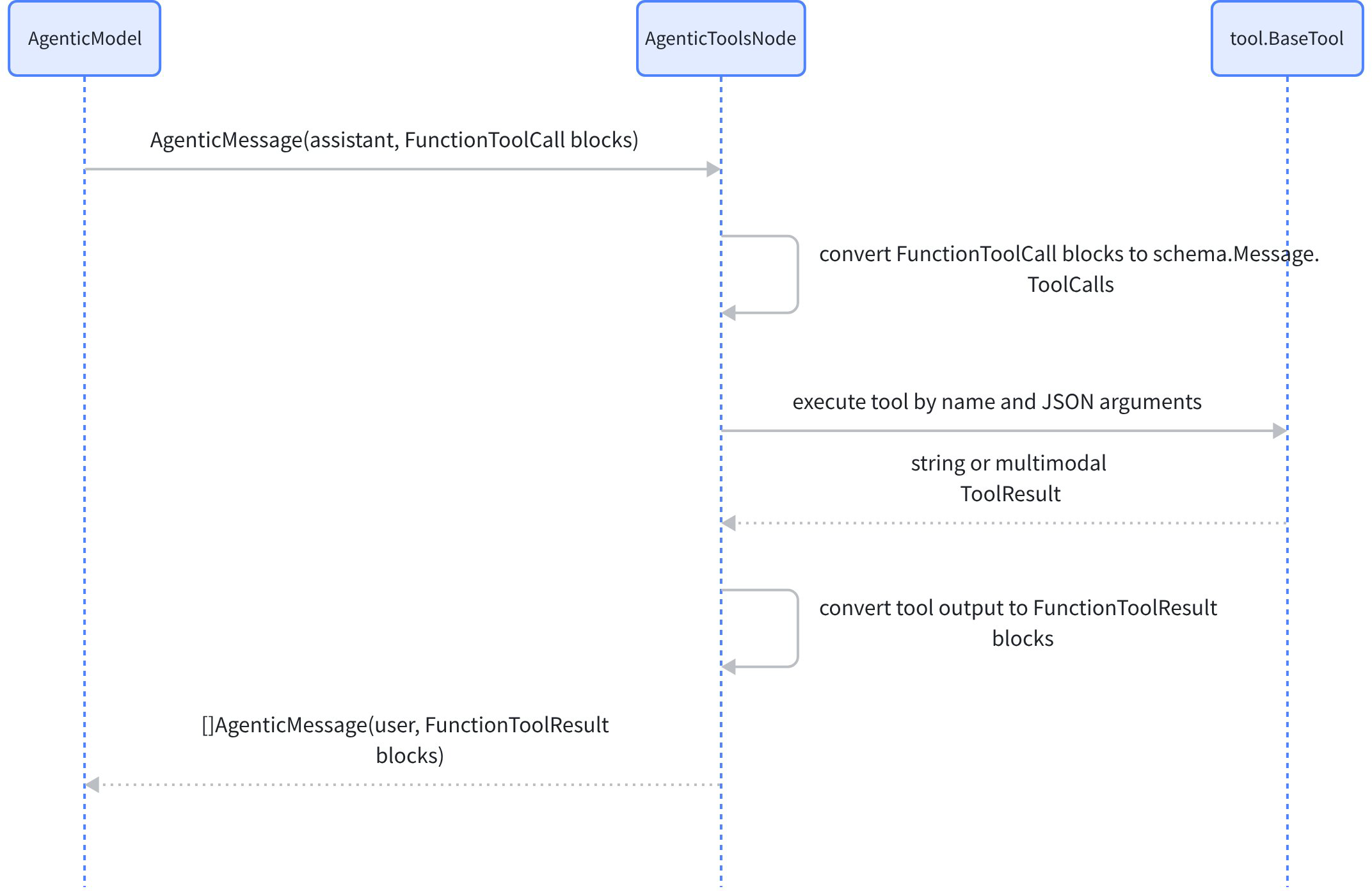
Core conversion logic:
- Only processes blocks with
ContentBlockTypeFunctionToolCalltype and non-nilFunctionToolCall. FunctionToolCall.CallIDis converted toschema.ToolCall.IDfor correlating tool results.- Standard tool output is converted to text blocks in
FunctionToolResult.Content. - Enhanced tool output is converted to text/image/audio/video/file blocks in
FunctionToolResult.Content. - Tool search results are converted to
ToolSearchFunctionToolResultblocks. - The output message role is
schema.AgenticRoleTypeUser.
ToolsNodeConfig
Code location: compose/tool_node.go
type ToolsNodeConfig struct {
    Tools                []tool.BaseTool
    ToolAliases          map[string]ToolAliasConfig
    UnknownToolsHandler  func(ctx context.Context, name, input string) (string, error)
    ExecuteSequentially  bool
    ToolArgumentsHandler func(ctx context.Context, name, arguments string) (string, error)
    ToolCallMiddlewares  []ToolMiddleware
}
| Field | Description |
Tools | List of executable tools. Each tool must implementtool.BaseTooland at least one execution interface |
ToolAliases | Tool name aliases and argument alias configuration for compatibility with non-standard names generated by models |
UnknownToolsHandler | Handles unknown tools hallucinated by the model; raises an error for unknown tools when not set |
ExecuteSequentially | truemeans execute tool calls sequentially in order; default falseexecutes in parallel |
ToolArgumentsHandler | Called after argument alias processing and before tool execution; can be used for argument cleaning or completion |
ToolCallMiddlewares | Tool execution middleware, supporting standard and enhanced, non-streaming and streaming tools |
ToolsNodeOption
type ToolsNodeOption func(o *toolsNodeOptions)

func WithToolOption(opts ...tool.Option) ToolsNodeOption
func WithToolList(tool ...tool.BaseTool) ToolsNodeOption
func WithToolAliases(toolAliases map[string]ToolAliasConfig) ToolsNodeOption
WithToolList and WithToolAliases are call-level override configurations:
WithToolList: Replaces the tool list for the current call.WithToolAliasescombined withWithToolList: Configures aliases for dynamic tool lists.WithToolAliasesused alone: Replaces the global alias configuration while keeping the original tool list.
Tool alias
Code location: compose/tool_node.go
type ToolAliasConfig struct {
    NameAliases      []string
    ArgumentsAliases map[string][]string
}
Semantic description:
| Config | Description |
NameAliases | Tool name aliases. When the model returns an alias, it will be resolved to the canonical tool name |
ArgumentsAliases | Argument aliases. Key is the canonical argument name, value is a list of aliases |
Example:
toolsNode, err := compose.NewAgenticToolsNode(ctx, &compose.ToolsNodeConfig{
    Tools: []tool.BaseTool{searchTool},
    ToolAliases: map[string]compose.ToolAliasConfig{
        "search": {
            NameAliases: []string{"web_search", "lookup"},
            ArgumentsAliases: map[string][]string{
                "query": {"q", "keyword"},
                "limit": {"count", "max_results"},
            },
        },
    },
})
Argument alias processing rules:
- Only processes keys in the top-level JSON object.
- Returns the original value when the string is empty, not an object, or JSON parsing fails.
- When the canonical key already exists, the alias will not override the canonical value.
- Alias remapping occurs before
ToolArgumentsHandler. - Alias configuration validates: empty aliases, empty canonical keys, canonical keys containing
., aliases conflicting with schema properties, and the same alias mapping to multiple canonical names.
Tool Interface
Eino currently does not export a unified interface named Tool. Tool capabilities are composed of the following interfaces in the components/tool package.
Code location: components/tool/interface.go
type BaseTool interface {
    Info(ctx context.Context) (*schema.ToolInfo, error)
}

type InvokableTool interface {
    BaseTool
    InvokableRun(ctx context.Context, argumentsInJSON string, opts ...Option) (string, error)
}

type StreamableTool interface {
    BaseTool
    StreamableRun(ctx context.Context, argumentsInJSON string, opts ...Option) (*schema.StreamReader[string], error)
}

type EnhancedInvokableTool interface {
    BaseTool
    InvokableRun(ctx context.Context, toolArgument *schema.ToolArgument, opts ...Option) (*schema.ToolResult, error)
}

type EnhancedStreamableTool interface {
    BaseTool
    StreamableRun(ctx context.Context, toolArgument *schema.ToolArgument, opts ...Option) (*schema.StreamReader[*schema.ToolResult], error)
}
Interface layers:
| Interface | Purpose |
BaseTool | Provides tool metadata that can be passed to the model for tool recognition |
InvokableTool | Non-streaming execution; input is a JSON string, returns a string |
StreamableTool | Streaming execution; input is a JSON string, returns a string stream |
EnhancedInvokableTool | Non-streaming enhanced tool; input is*schema.ToolArgument, returns multimodal *schema.ToolResult |
EnhancedStreamableTool | Streaming enhanced tool; returns a*schema.ToolResultstream |
💡 If a tool implements both the standard interface and the enhanced interface,
ToolsNodewill prioritize using the enhanced interface to preserve structured multimodal results.
ToolInfo
Code location: schema/tool.go
type ToolInfo struct {
    Name  string
    Desc  string
    Extra map[string]any
    *ParamsOneOf
}
Field descriptions:
| Field | Description |
Name | Unique tool name; should be concise and unique within the tool set |
Desc | Tells the model when, why, and how to use the tool; can include a few examples |
Extra | Additional metadata, defined by component implementations or business customizations |
ParamsOneOf | Parameter definition; can be constructed viaschema.NewParamsOneOfByParamsor schema.NewParamsOneOfByJSONSchema; nilmeans no parameters |
ToolArgument and ToolResult
Enhanced tools use structured input and multimodal output.
type ToolArgument struct {
    Text string
}

type ToolResult struct {
    Parts []ToolOutputPart
}
ToolOutputPart can represent text, image, audio, video, file, and tool search results. AgenticToolsNode converts enhanced output into multimodal blocks in FunctionToolResult.Content.
FunctionToolCall and FunctionToolResult
The input to AgenticToolsNode comes from FunctionToolCall blocks in schema.AgenticMessage:
type FunctionToolCall struct {
    CallID    string
    Name      string
    Arguments string
}
Tool execution results are converted to FunctionToolResult:
type FunctionToolResult struct {
    CallID  string
    Name    string
    Content []*FunctionToolResultContentBlock
}
FunctionToolResultContentBlock supports five content types: text, image, audio, video, and file. The current implementation no longer uses the Result string field.
Standalone Usage Example
toolsNode, err := compose.NewAgenticToolsNode(ctx, &compose.ToolsNodeConfig{
    Tools: []tool.BaseTool{weatherTool},
})
if err != nil {
    return err
}

input := &schema.AgenticMessage{
    Role: schema.AgenticRoleTypeAssistant,
    ContentBlocks: []*schema.ContentBlock{
        schema.NewContentBlock(&schema.FunctionToolCall{
            CallID:    "call_1",
            Name:      "get_weather",
            Arguments: `{"city":"Shenzhen","date":"tomorrow"}`,
        }),
    },
}

messages, err := toolsNode.Invoke(ctx, input)
if err != nil {
    return err
}
Output example:
[]*schema.AgenticMessage{
    {
        Role: schema.AgenticRoleTypeUser,
        ContentBlocks: []*schema.ContentBlock{
            schema.NewContentBlock(&schema.FunctionToolResult{
                CallID: "call_1",
                Name:   "get_weather",
                Content: []*schema.FunctionToolResultContentBlock{
                    {
                        Type: schema.FunctionToolResultContentBlockTypeText,
                        Text: &schema.UserInputText{Text: "sunny"},
                    },
                },
            }),
        },
    },
}
Using in Orchestration
Chain
Code location: compose/chain.go
func (c *Chain[I, O]) AppendAgenticToolsNode(node *AgenticToolsNode, opts ...GraphAddNodeOpt) *Chain[I, O]
chain := compose.NewChain[*schema.AgenticMessage, []*schema.AgenticMessage]()
chain.AppendAgenticToolsNode(toolsNode)
Graph
Code location: compose/graph.go
func (g *graph) AddAgenticToolsNode(key string, node *AgenticToolsNode, opts ...GraphAddNodeOpt) error
graph := compose.NewGraph[*schema.AgenticMessage, []*schema.AgenticMessage]()
err := graph.AddAgenticToolsNode("tools", toolsNode)
if err != nil {
    return err
}
Workflow, Parallel, ChainBranch
func (wf *Workflow[I, O]) AddAgenticToolsNode(key string, tools *AgenticToolsNode, opts ...GraphAddNodeOpt) *WorkflowNode

func (p *Parallel) AddAgenticToolsNode(outputKey string, node *AgenticToolsNode, opts ...GraphAddNodeOpt) *Parallel

func (cb *ChainBranch) AddAgenticToolsNode(key string, node *AgenticToolsNode, opts ...GraphAddNodeOpt) *ChainBranch
Callback
Code location: utils/callbacks/template.go
type AgenticToolsNodeCallbackHandlers struct {
    OnStart               func(ctx context.Context, info *callbacks.RunInfo, input *schema.AgenticMessage) context.Context
    OnEnd                 func(ctx context.Context, info *callbacks.RunInfo, input []*schema.AgenticMessage) context.Context
    OnEndWithStreamOutput func(ctx context.Context, info *callbacks.RunInfo, output *schema.StreamReader[[]*schema.AgenticMessage]) context.Context
    OnError               func(ctx context.Context, info *callbacks.RunInfo, err error) context.Context
}
Registration example:
handler := callbackHelper.NewHandlerHelper().
    AgenticToolsNode(&callbackHelper.AgenticToolsNodeCallbackHandlers{
        OnStart: func(ctx context.Context, info *callbacks.RunInfo, input *schema.AgenticMessage) context.Context {
            fmt.Printf("tool call blocks: %d\n", len(input.ContentBlocks))
            return ctx
        },
        OnEnd: func(ctx context.Context, info *callbacks.RunInfo, output []*schema.AgenticMessage) context.Context {
            fmt.Printf("tool results: %d\n", len(output))
            return ctx
        },
    }).
    Handler()

result, err := runnable.Invoke(ctx, input, compose.WithCallbacks(handler))
Getting ToolCallID
Code location: compose/tool_node.go
func GetToolCallID(ctx context.Context) string
Within a tool function body or tool callback handler, you can use compose.GetToolCallID(ctx) to get the current tool call ID.
func (t *MyTool) InvokableRun(ctx context.Context, args string, opts ...tool.Option) (string, error) {
    callID := compose.GetToolCallID(ctx)
    // An empty callID indicates the current ctx is not in a tool call execution context, or the context value type does not match.
    return callID, nil
}
Usage Recommendations
- In documentation and code, refer to
tool.BaseTool,InvokableTool,StreamableTool,EnhancedInvokableTool,EnhancedStreamableTool—do not use an exportedToolinterface that does not exist in the source code. - If a tool may return images, audio, video, or files, prefer implementing the enhanced interface to avoid flattening multimodal results into a string.
- Multiple tool calls execute in parallel by default; set
ExecuteSequentially: truewhen order needs to be preserved or tools have side-effect dependencies. - When using
ToolArgumentsHandlerfor argument cleaning, note that it executes after argument alias remapping. UnknownToolsHandleris suitable as a fallback for tool names hallucinated by the model, but should not mask real configuration errors.
Existing Implementations
- Google Search Tool: Tool implementation based on Google search Tool - Googlesearch
- DuckDuckGo Search Tool: Tool implementation based on DuckDuckGo search Tool - DuckDuckGoSearch
- MCP: Use MCP server as a tool Eino Tool - MCP
Tool Implementation Methods
- HTTP API-based tool implementation: How to create a tool/function call using OpenAPI?
- gRPC-based tool implementation: How to create a tool/function call using proto3?
- Thrift-based tool implementation: How to create a tool/function call using thrift IDL?
- Local function-based tool implementation: How to create a tool?